To-Do List Excel Template

A to-do list is definitely essential for everyday office use. How could I forget to create such a necessary template! The research results on my website show that people search for “to-do”, “to-do list”. Well, it’s time I created a to-do list Excel template!

Before we come to the template, here are some important facts about using a to-do list.

Taming the Chaos: Why a Simple To-Do List Can Transform Your Productivity

In today’s fast-paced world, it often feels like we’re juggling a dozen balls at once. Work tasks, personal errands, appointments, project deadlines – the sheer volume of things demanding our attention can feel overwhelming and lead to stress, missed deadlines, and a nagging feeling that we’re constantly behind.

But there’s a remarkably simple yet powerful tool that can help bring order to this chaos: the humble to-do list.

You might think of a to-do list as just a simple shopping list for your daily life, but its benefits extend far beyond mere reminders.

Why Using a To-Do List is Hugely Helpful

  1. Reduces Mental Clutter: Our brains are fantastic at creative thinking and problem-solving, but they’re not designed to be perfect storage units for endless tasks. Writing down everything you need to do frees up mental space. Instead of using energy trying to remember everything, you can use that energy to actually do things.
  2. Provides Clarity and Focus: A list lays out everything you need to accomplish in one place. This visual overview helps you see the scope of your work, understand what’s truly important, and prevents tasks from slipping through the cracks. It gives you a clear target to aim for each day.
  3. Boosts Motivation and Reduces Procrastination: Seeing your tasks written down makes them feel more manageable. Checking off completed items provides a sense of accomplishment and progress, creating positive momentum that encourages you to tackle the next item.
  4. Helps with Prioritization: When everything is written down, it’s easier to assess what needs to be done first. You can quickly identify urgent tasks versus less critical ones, allowing you to allocate your time and energy effectively.
  5. Tracks Progress: A to-do list is a tangible record of your achievements. Looking back at completed tasks can be incredibly motivating and serves as a reminder of how productive you’ve been.

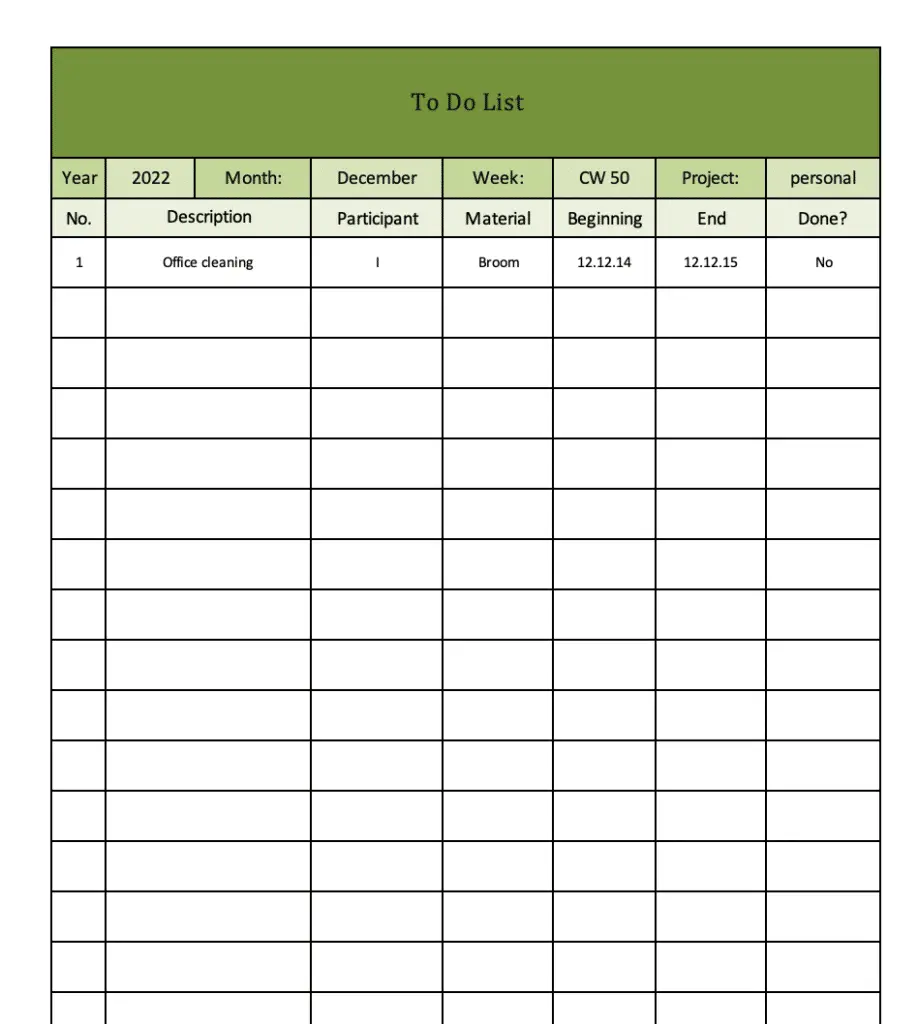
Take a look at the Screenshots of our To-Do List Excel Template

The simple to-do list:

Simple To-Do-List Excel Template
Simple to-do list

The more detailed to-do list:

To-Do List Excel Template

To do list Excel template

How to Use Your To-Do List for Maximum Effectiveness

Creating a list is one thing, but using it well is key. Here are some best practices:

  1. Choose Your Medium: Whether it’s a physical notebook, a sticky note app on your phone, a dedicated productivity app (like Todoist, Microsoft To Do, or simple notes apps), or an Excel spreadsheet, pick a method you’ll actually use and stick with.
  2. Write Down Everything: Don’t just list big projects. Include small tasks like “send that email,” “call the bank,” or “schedule dentist appointment.” Getting everything out of your head is the first step.
  3. Be Specific and Action-Oriented: Instead of writing “Project X,” write “Email report draft for Project X to John” or “Research competitors for Project X.” Use verbs that describe the action needed.
  4. Break Down Big Tasks: A huge task like “Plan Conference” can feel daunting. Break it into smaller, actionable steps: “Book venue,” “Finalize speaker list,” “Create marketing flyer.”
  5. Prioritize Your List: Once you have your list, decide what’s most important. Use a simple system like numbering tasks from 1 (highest priority) down, or marking tasks as A (high), B (medium), C (low) priority. Focus on tackling your high-priority items first.
  6. Schedule Tasks (Optional but recommended): For crucial tasks, assign them a specific time or block in your calendar. This turns “I need to do this” into “I will do this at 2 PM.”
  7. Review and Update Daily: Start each day by looking at your list. Add new tasks, cross off completed ones, and reprioritize if needed. This keeps your list fresh and relevant.
  8. Celebrate Completions: There’s genuine satisfaction in checking off a task. Acknowledge your progress! If you don’t finish everything, simply move incomplete tasks to the next day – life happens, be flexible.

A to-do list is more than just a reminder; it’s a roadmap for your day and week. By externalizing your tasks and using your list strategically, you gain control over your workload, reduce stress, and consistently move closer to achieving your goals. Start creating your list today and experience the power of organized productivity!

Download the To-Do List Template for free

Here you find this template in different file formats (XLSX and PDF).

More To-Do List Templates online

A little research showed that there are other good to-do list templates to download:

Frequently Asked Questions about To-Do Lists

Q: Should I put small, quick tasks on my list?
A: Absolutely! Including small tasks helps you remember them and gives you easy wins to check off, which builds momentum and makes you feel productive.

Q: What if my list gets too long and feels overwhelming?
A: This is common! First, make sure you’re prioritizing. Focus only on the top 3-5 most important tasks for the day. Second, break down large or daunting tasks into smaller, more manageable steps. Third, accept that you might not finish everything every day – move less critical items to tomorrow.

Q: Digital or paper list – which is better?
A: There’s no single “better.” Choose the one you are most likely to use consistently. Paper is great for focus and visual satisfaction; digital lists offer syncing across devices, reminders, and easy editing. Try both and see what works for you.

Q: How often should I look at or update my list?
A: Ideally, review and update your list at the start of each workday or day to plan ahead. A quick check throughout the day can also help keep you on track. At the end of the day, you can review what was accomplished and plan for tomorrow.

Q: What if I don’t finish everything on my list?
A: Don’t beat yourself up! It’s normal not to finish every single item every day. Simply move the unfinished tasks to the next day’s list, re-prioritize them, and adjust your expectations if necessary. The goal is progress, not perfection.

1 thought on “To-Do List Excel Template”

Leave a Comment

Pin It on Pinterest